Shopify first order discount popup: how to set up a welcome offer that gets used (2026)
By Primož Iršič, founder of Kodra Apps · · 8 min read
Show the popup after the visitor has browsed for a moment, keep the offer simple, give each person a unique single-use code with a clear expiry, and make sure the code applies at checkout without extra steps.
Key takeaways
- Pick one simple offer: percent off, a fixed amount, or free shipping. Check it against your margin first.
- Use unique single-use codes and one discount per email, so the offer cannot be shared or claimed twice.
- Show the popup after a short delay or on exit intent, once per visit, and never again after someone claims it.
- Auto-apply the code at checkout. Shopify itself notes that forgotten discount codes might lead to cart abandonment.
- Test one change at a time: the offer, the headline or the trigger.
What is a Shopify first order discount popup, and when should you use one?
It is a popup that offers new visitors a discount on their first order when they sign up with their email. It does two jobs at once: it grows your list and gives a first-time visitor a reason to buy now.
Use one when:
- Most of your traffic is new. Paid social, influencer traffic and BFCM traffic often are.
- Your margin allows it. You can afford a discount on the first order to win a repeat customer.
- You have a welcome email ready. The popup is the start of a relationship, not the end.
Skip it, or switch to an early-access offer, if your products are rarely discounted and your brand depends on full price.
How big should your first order discount be?
There is no single right number. Start from your margin, not from what other stores offer.
Do the math before you pick a number
Example only: if your average order is $60 and your margin after shipping and fees is $24, a 15% discount costs $9 of that $24. A $10 fixed discount costs $10. Write down what one new customer is worth to you over time, and choose a discount that still leaves room for profit.
Compare offer types
| Offer type | Example | Works well when | Watch out for |
|---|---|---|---|
| Percent off | 10% off your first order | Wide range of prices | Big discounts on big carts |
| Fixed amount | $10 off orders over $50 | You want a predictable cost | Needs a minimum order amount |
| Free shipping | Free shipping on your first order | Shipping cost is a common reason to leave | Less appealing on cheap items |
| Tiered reward | 15% if you win on the first try, 10% otherwise | You use a game popup | Keep the rules simple |
| Early access | First access to our Black Friday sale | You do not want to discount today | Needs a clear date and promise |
Running a game popup? Reward tiers let you give a slightly better code for winning on the first attempt. Our guide to the spin wheel popup alternative for Shopify explains how game popups compare with wheels.
How do you set up a first order discount in Shopify?
You have two ways to do it: a manual discount code in Shopify, or an app that creates codes for each subscriber.
Option 1: One discount code in Shopify admin
Go to Discounts in your Shopify admin and create a discount code. According to the Shopify Help Center, you can set:
- The dates the code is valid
- How many times the code can be used
- A minimum order amount
- Which products, collections or variants it applies to
- Whether it combines with other discounts
Shopify also has a "one use per customer" limit. Note that it applies only to that specific discount: if you delete it and create a duplicate, past users can use the new one once too.
Option 2: Unique codes from a popup app
A popup app can create a new single-use code for every subscriber and show it right after signup. Shopify allows up to 20,000,000 unique discount codes per store, so there is plenty of room for one code per person.
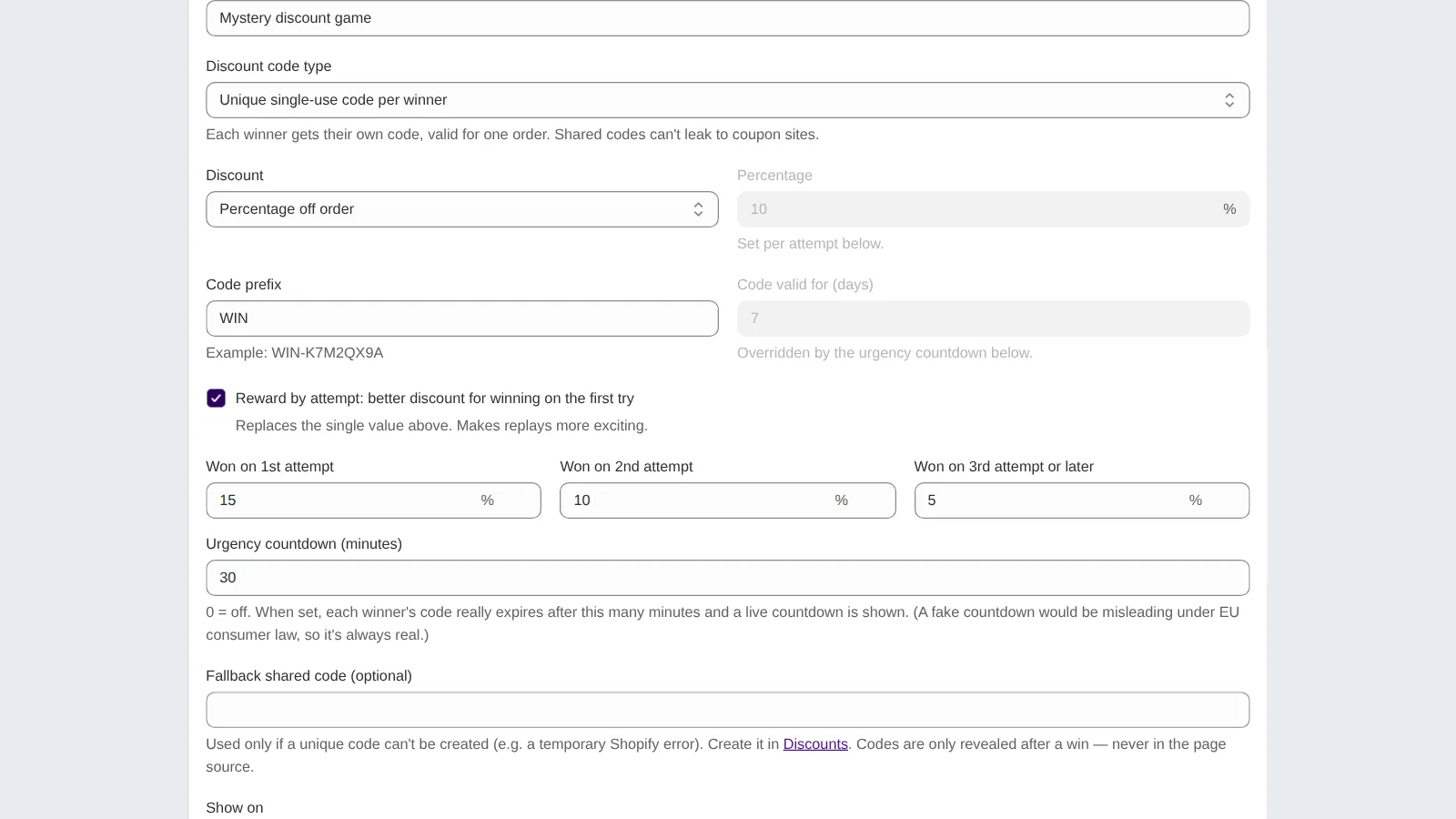
With Kodra Play, for example, you choose "unique single-use code per winner," set the discount, a code prefix like WIN, and an expiry in minutes. The steps are in the Kodra Play docs.
How do you keep first-order codes from being abused?
A first order discount is meant for new subscribers. Without limits, it ends up on coupon sites or gets claimed with a second email.
Use these protections together:
- Unique single-use codes. A code shared online works only once.
- One discount per email. The same shopper cannot sign up again and again.
- A real expiry. A code that expires soon pushes the first order and limits misuse.
- A minimum order amount. Optional, and helpful with fixed-amount offers.
- No public "WELCOME" code. If you have an old shared code live, retire it.
Kodra Play gives every winner a unique single-use code with a real expiry countdown, allows one discount per email, and applies the code at checkout automatically. It is free until the popup brings you $500 in sales a month. See how Kodra Play handles discount codes.
When and where should the welcome popup appear?
Timing decides whether people read your offer or close it on reflex.
Pick a trigger
- Delay: open after the visitor has had a few seconds to look around.
- Exit intent: open when the visitor is about to leave.
- Both, whichever comes first: a common setup for welcome offers.
Set the frequency
Show it once per visit, and stop showing it after someone has claimed a code. A small floating button lets visitors reopen it if they closed it too fast.
Keep it small enough
Google's guidance on intrusive interstitials and dialogs recommends that you do not obscure the entire page. Keep the popup smaller than the screen, especially on phones, and make the close button easy to tap.
What should the popup say?
People read a popup in a second or two. Use a short headline, one line of detail, one field and one button.
Headline formulas
- "Get 10% off your first order"
- "Free shipping on your first order"
- "Play for 15 seconds, win a discount"
Supporting line
Say what they get, how long it lasts and what happens next. Example: "Enter your email, and we will apply your code at checkout. It expires in 30 minutes."
Consent text
Make it clear that signing up means marketing emails, and that they can unsubscribe at any time. If you turn on double opt-in, Shopify recommends updating your confirmation message so customers know to check their email (Shopify Help Center). Our guide to email popup consent covers the rules.
How do you make the code easy to use at checkout?
The Shopify Help Center notes that forgotten discount codes might lead to cart abandonment. So remove every step between "I won a code" and "I paid."
- Auto-apply the code at checkout. The shopper does not need to copy or remember anything.
- Show the code and its expiry on screen. A visible countdown reminds them it is real.
- Remind them while they browse. A floating button or bar with the code keeps it in view.
- Repeat the code in the welcome email, for anyone who comes back later.
How do you test and improve your welcome offer?
Change one thing at a time, and judge by orders, not only by signups.
| Test | Version A | Version B | What to measure |
|---|---|---|---|
| Offer | 10% off | Free shipping | Code uses and revenue |
| Format | Plain email popup | Short game popup | Emails collected and code uses |
| Trigger | Delay | Exit intent | Signups per view |
| Expiry | 24 hours | 30 minutes | Code uses and complaints |
Before Black Friday on November 27, 2026, settle your welcome offer early so you are not testing during the busiest week. Our plan to grow your email list on Shopify before Black Friday has a dated calendar. If you are also replacing an old popup app, see our comparison of Privy alternatives for Shopify.
Set up your welcome offer before the BFCM rush
A first order discount popup works when the offer is simple, the code is unique and the checkout is easy. Get those three right, then test one change at a time.
Set it up now, so it is ready well before November 27.
FAQ
How do I create a first-time customer discount on Shopify?
Create a discount code under Discounts in your Shopify admin and limit it to one use per customer, with dates and a minimum order if needed. To give every new subscriber their own code automatically, use a popup app that creates unique single-use codes and shows them right after signup.
What is a good first order discount percentage?
It depends on your margin and average order value, so there is no universal number. Work out how much of each first order you can give away and still profit, then test. Many stores test a percent discount against free shipping or a fixed amount to see which brings more paid orders.
Can Shopify automatically apply a discount code from a popup?
Yes, if the popup app supports it. Some apps pass the code to checkout so the shopper does not type it. Kodra Play applies each winner's unique code at checkout automatically. Shopify's Help Center notes that forgotten discount codes might lead to cart abandonment, so auto-apply is worth having.
How do I stop people from using a welcome code twice?
Use unique single-use codes instead of one shared code, and limit claims to one discount per email. Shopify's "one use per customer" setting helps for a single code, but it only applies to that specific discount. Add an expiry so unused codes do not stay valid for months.
Should a welcome popup show on mobile?
Yes, but make it mobile-friendly. Keep it smaller than the screen, use one email field, and make the close button easy to tap. Google advises against interstitials that obscure the entire page, so a compact popup or a small banner is a safer choice on phones.