Spin wheel popup alternative for Shopify: how to run a gamified email popup in 2026
By Primož Iršič, founder of Kodra Apps · · 8 min read
A practical spin wheel popup alternative for Shopify is a short skill game: the visitor enters an email, plays for a few seconds and wins a unique discount code. This guide compares the formats, the pricing models and the setup steps.
Key takeaways
- Spin wheels are pure chance. A short skill game gives the visitor something to do, and the reward feels earned.
- The format matters less than the code. Unique single-use codes stop one discount from spreading across coupon sites.
- Check where emails go. If they land as Shopify customers with marketing consent, any email tool that syncs Shopify customers can use them.
- Compare pricing models, not just prices. Apps charge by pageviews, impressions, visitors or popup revenue.
- Follow Google's guidance on popups: do not cover the whole page, and give visitors time before the popup opens.
Why look for a spin wheel popup alternative?
Spin to win popups became popular because they turn a boring email form into a moment of fun. That still works. But the format has a few weak spots you should know about.
Shoppers have seen it before
"Spin the wheel" is its own pop-up type filter on the Shopify App Store, and many popup apps offer it. When a format is everywhere, visitors start to recognize it and close it on reflex.
Shared codes leak
Many stores run one code for everyone, like WELCOME10. Once it is posted on a coupon site, people who never signed up use it too. That costs you margin and teaches shoppers to search for codes instead of joining your list.
Luck does not feel earned
A wheel decides the prize for the visitor. A skill game lets them try, fail and try again. That small sense of control is the main difference between the two formats.
What are the main types of gamified email popups?
Here are the formats you will find in Shopify popup apps today. Each one asks for an email in exchange for a reward.
| Format | How it works | Visitor effort | Watch out for |
|---|---|---|---|
| Spin wheel | Visitor spins, a random slice picks the prize | One click | Familiar format, prize is pure luck |
| Scratch card | Visitor scratches a card to reveal the prize | A few swipes | Also chance based |
| Mystery box or chest | Visitor picks a box, prize is revealed | One click | Feels similar to a wheel |
| Slots or Plinko | Random outcome with more animation | One click | Can feel like gambling to some shoppers |
| Quiz | Visitor answers questions, gets a matched offer | 30 seconds or more | Takes longer to build |
| Skill mini game (paddle, flipper, pong) | Visitor plays a short round to win | About 15 seconds | Needs a fair difficulty setting |
If your goal is "something that is not a wheel," any of these work. If your goal is "something that feels different and earned," a skill game is the clearest step away from spin to win.
How does a skill-based popup game work on Shopify?
Here is the flow, using Kodra Play's gamified email popup as the example.
- The popup opens. After a delay, on exit intent, or when the visitor taps a floating button.
- The visitor enters an email. They can opt in to marketing at this step.
- They play a 15-second round. Paddle, flipper or pong, in your brand colors.
- They win a unique code. It is single-use and has a real expiry countdown.
- The code applies at checkout automatically. No copy and paste.
- The email is saved as a Shopify customer. With marketing consent when the visitor opted in.
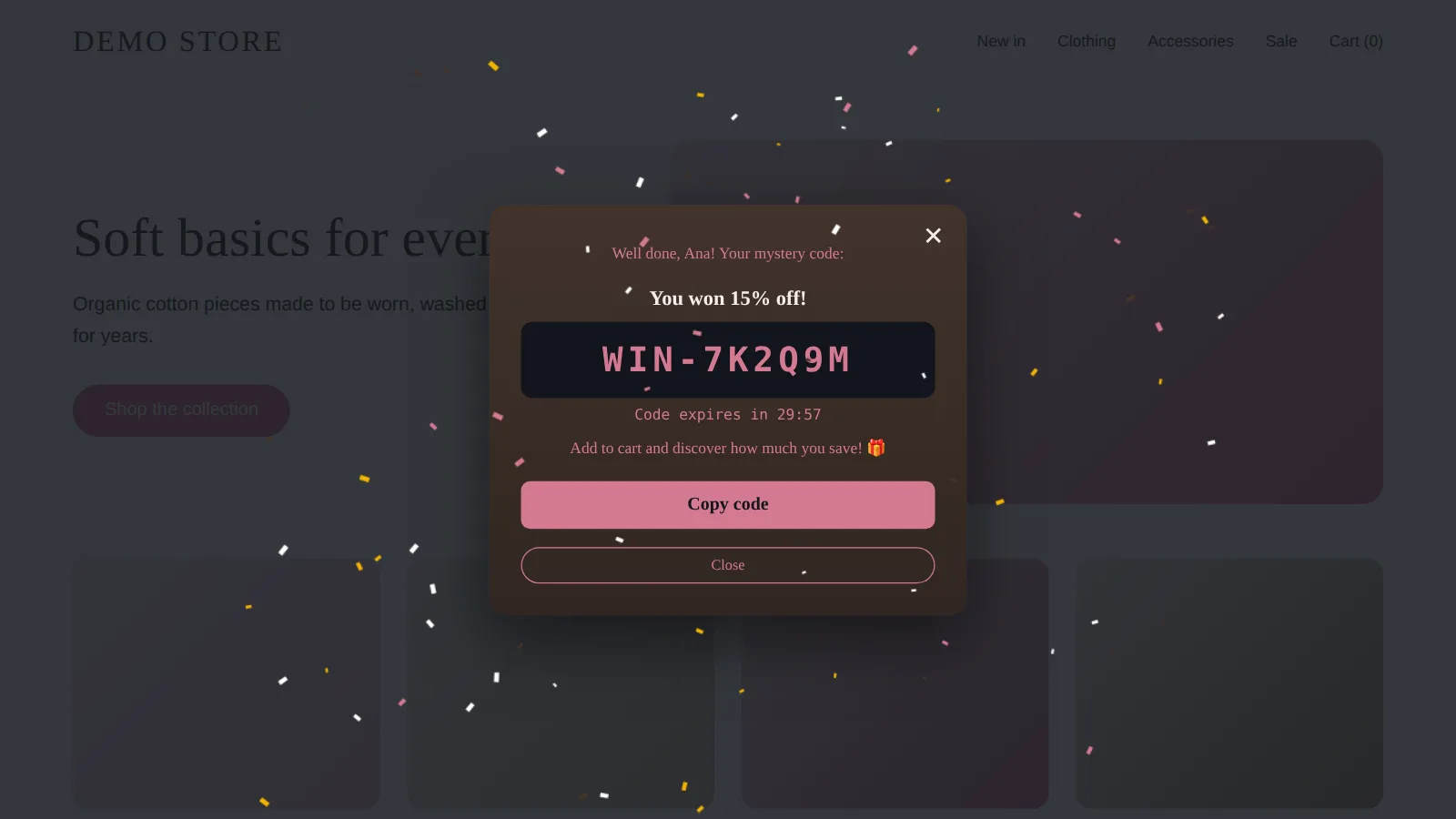
The last step matters more than it looks. Shopify lists subscribers who accepted marketing in the default Email subscribers segment on the Customers page, according to the Shopify Help Center guide on collecting customer contact information. Your email tool can pick them up from there.
What should you compare before choosing a popup game app?
The game is the fun part. These five checks decide whether the popup actually pays off.
1. Code type: unique or shared
Ask if every winner gets their own single-use code. Shopify discount codes can limit how many times a code can be used, and Shopify allows up to 20,000,000 unique discount codes per store, as the Shopify Help Center page on discount codes explains. A good app creates these for you.
2. Where the emails go
Some apps keep subscribers in their own database and sync them out. Others save them straight into Shopify. Saving to Shopify means one source of truth and fewer sync problems.
3. Pricing model
This is where apps differ most. Here is how four gamified or popup apps charge, based on their Shopify App Store listings checked on October 24, 2026.
| App | What the price is based on | Free plan as listed | Lowest paid plan as listed |
|---|---|---|---|
| Kodra Play | Popup revenue (orders that used its codes in the last 30 days) | Up to $500 popup revenue per 30 days | $9.99/month, up to $3,000 popup revenue |
| Wheelify | Wheel impressions | Up to 300 wheel impressions, usage charges may apply above that | $9.99/month, unlimited impressions |
| OptiMonk | Pageviews | 10,000 pageviews per month | $29/month, 20,000 pageviews |
| Wheelio | Popup impressions | No free plan, 7-day free trial | $14.92/month, up to 30,000 impressions |
Sources: Kodra Play, Wheelify, OptiMonk, Wheelio on the Shopify App Store. Prices can change, so check the listing before you install.
Traffic-based pricing means you pay for visitors who never sign up. Revenue-based pricing means you pay once the popup is bringing in orders. Neither is right for everyone, so match it to your traffic and conversion rate. For a full side-by-side of 10 apps, see our comparison of Privy alternatives for Shopify.
4. Privacy and hosting
If you sell to the UK or EU, ask where the app is hosted and what it stores. Kodra Play, for example, is hosted in Frankfurt (EU) and does not store visitor names or emails on its own servers.
5. Theme compatibility
Look for an app embed that works with Online Store 2.0 themes. That way you switch it on in the theme editor and do not touch code.
How do you set up a gamified popup in Shopify?
These steps follow the Kodra Play setup guide. Most game popup apps follow a similar path.
- Install the app from the Shopify App Store and approve it in your admin.
- Turn on the app embed. Go to Online Store, Themes, Customize, App embeds. Switch it on and save.
- Set up the discount. Pick "unique single-use code per winner," set the amount and a code prefix like WIN.
- Add reward tiers if you want them. For example, a bigger discount for winning on the first try.
- Set an expiry. A real countdown gives shoppers a reason to order now.
- Choose the game and trigger. Exit intent, a delay, or whichever comes first.
- Match your brand colors. Use your theme colors so the popup looks like part of your store.
- Preview on desktop and phone, then publish.
Want to try a skill game instead of a wheel? Kodra Play is free until the popup brings you $500 in sales a month, and the team can set up your first popup with you. See how Kodra Play works.
How do you keep a game popup from hurting the shopping experience?
A popup that annoys people costs you more than it earns. Google's guidance on intrusive interstitials and dialogs says dialogs that block content can frustrate users and make it harder for search engines to understand your page. It recommends you do not obscure the entire page.
Practical rules:
- Wait before showing it. Give visitors a few seconds or a scroll before the popup opens.
- Show it once per visit. And never again after someone wins.
- Size it for phones. Keep the close button easy to tap.
- Offer a way back. A small floating button lets people return to the game later.
- Keep the game short. Fifteen seconds is a round, not a commitment.
How do you know if it beats your spin wheel?
Run both and compare. If your app supports A/B testing, test the game popup against your current wheel for the same pages and traffic.
Track these numbers per popup:
- Views and emails collected
- Plays and wins
- Code uses at checkout
- Revenue from orders that used a popup code
- Desktop vs phone, since mobile often behaves differently
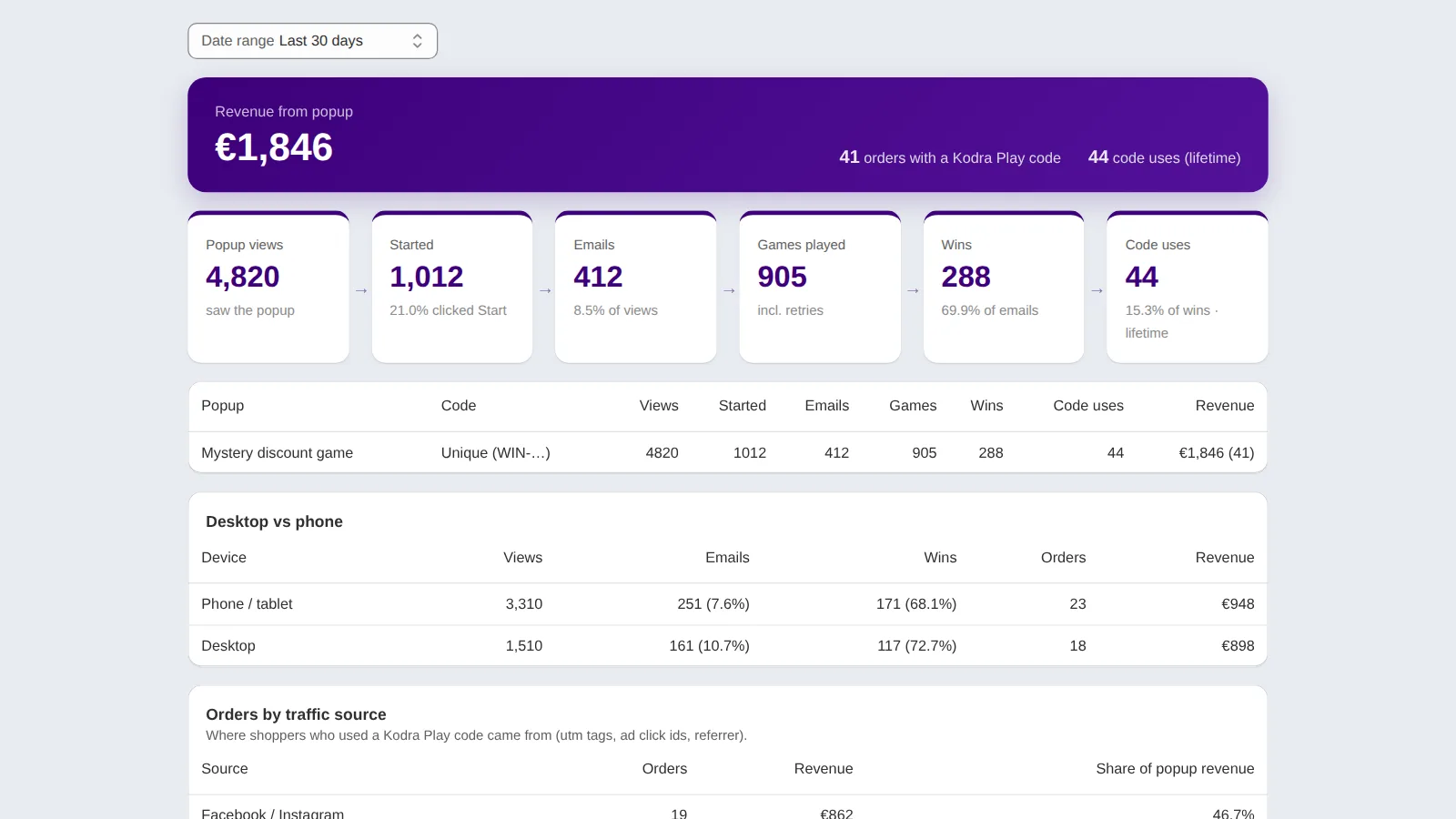
Give the test enough time to collect real orders, not just signups. A popup that collects more emails but fewer orders is not a win.
If your main goal is a bigger list before BFCM, read our step-by-step plan to grow your email list on Shopify before Black Friday. If you want to fine-tune the offer itself, see our guide to the Shopify first order discount popup.
Ready to try something other than a wheel?
Spin wheels still work, but they are familiar and based on luck. A short skill game, unique codes and clear tracking give you a fresh popup and cleaner numbers.
Start small. Run one popup, test it against your current one, and keep whichever brings in more orders.
FAQ
What is a good alternative to a spin wheel popup on Shopify?
A short skill-based mini game is a clear alternative. The visitor enters an email, plays a quick round such as paddle or pong, and wins a unique discount code. Scratch cards, mystery boxes and quizzes are other options, but most of them are still based on chance rather than play.
Do gamified popups work better than plain email popups?
It depends on your store, offer and traffic, so test it. A game gives visitors a reason to interact instead of closing the popup, but the offer and timing still matter. Run an A/B test against your current popup and compare emails collected, code uses and revenue, not only signups.
Are spin wheel popups bad for SEO?
The wheel itself is not the issue. Google warns that intrusive dialogs which cover the whole page can frustrate users and hurt how search engines understand your content. Keep the popup smaller than the screen, delay it, and make it easy to close, whatever game you use.
How do I stop discount codes from being shared online?
Give every winner their own single-use code instead of one shared code. Shopify lets you limit how many times a code can be used. A popup app that creates unique codes automatically, and allows one discount per email, means a code posted online only works once.
Can a popup game send emails to Klaviyo or Omnisend?
If the app saves emails as Shopify customers with marketing consent, email tools that sync customers from Shopify can pick them up. Check your email tool's Shopify integration settings to confirm it imports subscribers. Some popup apps also offer direct integrations, so check the listing of the app you choose.